Deck³ is an app for Mac and Windows that puts Bluesky in columns, side by side and with livestreaming in some of them. I built it for a not very noble reason: I missed TweetDeck.
TweetDeck was good, it was how I read the town square of the internet that the late Twitter used to be. A row of columns, each one minding its own business, all of them updating on their own. Timeline, mentions, a saved search in the corner, the work account one column over. Nobody opened TweetDeck to take a quick look. You left it open and the information came to you.
Then Twitter was sold, bought by a completely inept creature who was not loved enough when he was younger, and he put TweetDeck behind a subscription, changed its name and turned it into something else. Enshittified it got.
When Bluesky showed up as an alternative to Twitter, I expected TweetDeck to eventually come along with it. But the developers over there seem more interested in Waffles than in making apps. So there I was until now, in a browser tab, hitting refresh on it like the Phoenicians used to.
The Bluesky mobile clients are good, but I wanted that row of columns back, the one you opened in the morning, left open all day and closed at the end of the day along with the laptop lid, without ever having thought about the app itself. So I went and made it.
The name is silly on purpose. Deck, deck, deck. I promised myself I would swap it for something serious, something rounder, before shipping. I did not swap it in time, and it went out on both stores as DeckDeckDeck. It is Deck³ now, which is the same joke with fewer keystrokes: three decks, cubed.
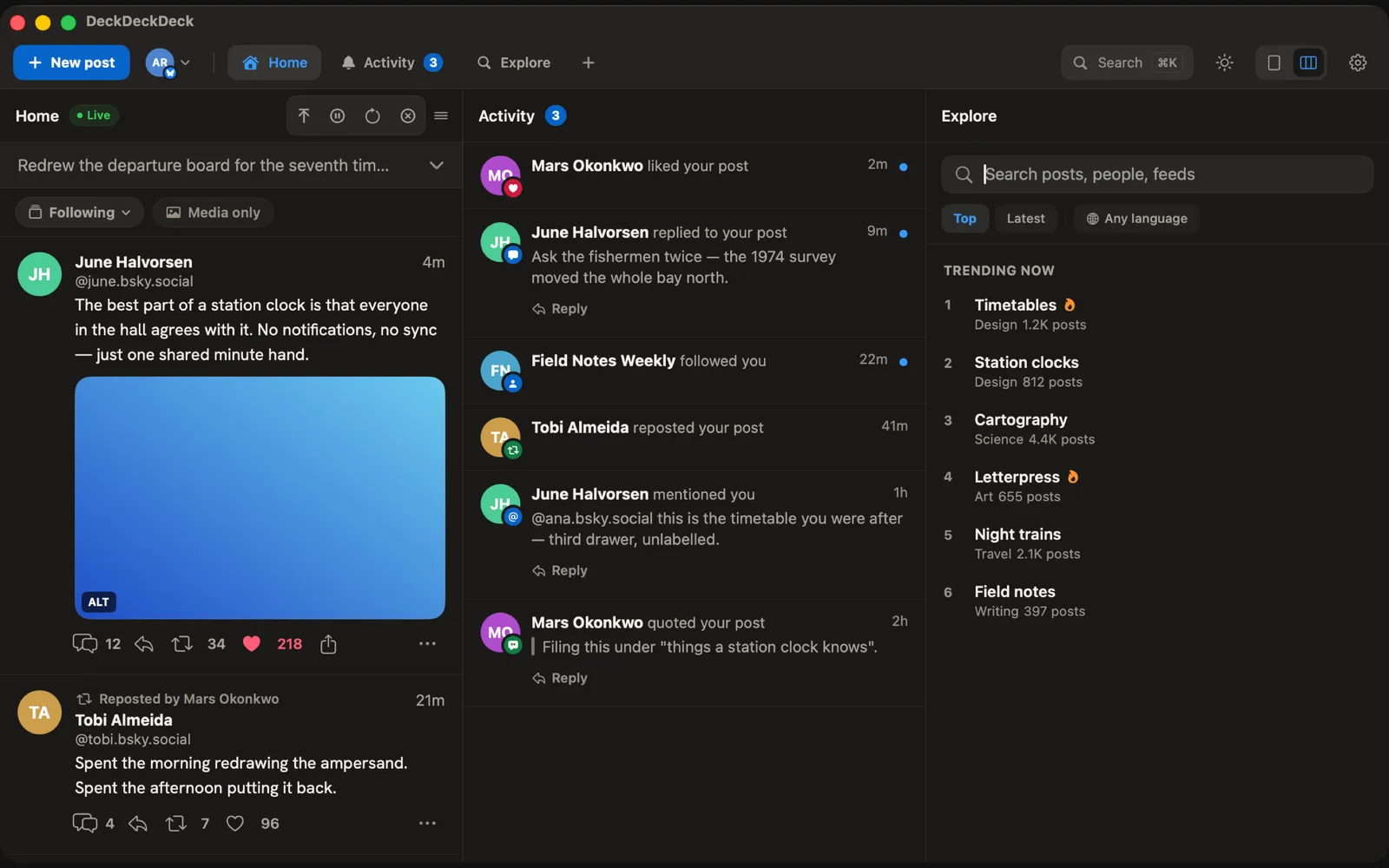
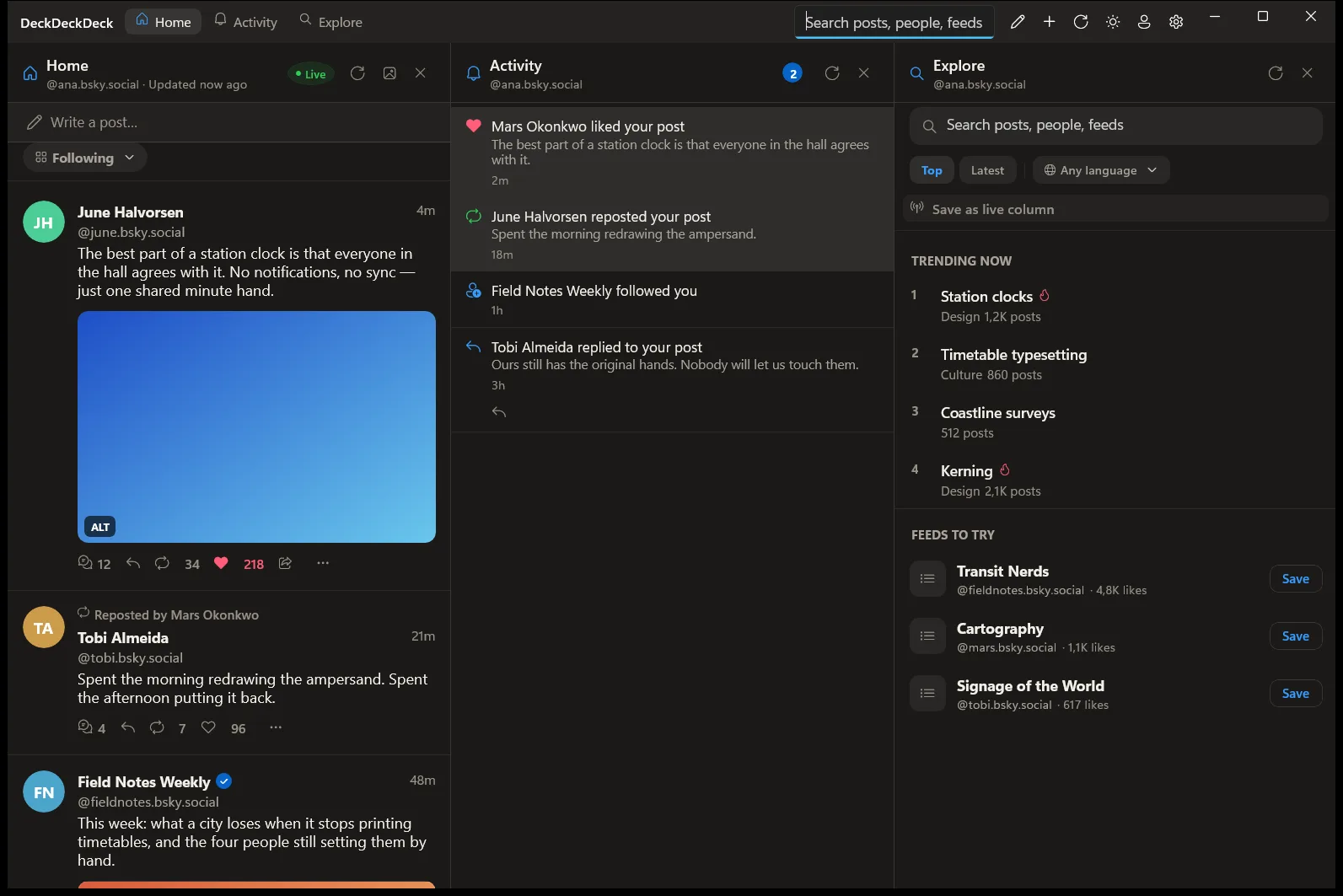
The same deck on macOS (top) and on Windows (bottom).
Every account gets whatever columns you want: Home, Activity, Search, Lists, Messages, a profile, a saved feed. You drag them into whatever order makes sense. ⌘1 to ⌘9 jumps between them, J and K move through posts, O opens the conversation, R replies, L likes. Anyone with two accounts knows the routine of signing out of one, signing into the other and posting from the wrong profile anyway. Here you write once, tick the accounts and publish.
Columns are born live. Post published, post on your screen, straight from Jetstream. This is great and it is terrible at the same time, and I know it well. So there is a button that swaps real time for one refresh a minute and another that pauses it entirely, for anyone who needs to come up for air. The default is the livestream because that is how I wanted it, but I remembered that not everybody enjoys being chronically online, so I added those limiters.
The rest showed up along the way, from the new features to the bugs. And I worked through them in whatever spare hours I had.
One annoying bug I fixed was a post link pasted into the composer becoming a quote instead of a card. The reason is small and it bothered me for days: the card bsky.app generates for a post carries the author’s name and photo and not one word of what that person wrote. You shared a post and published a portrait.
There is also a secret menu that only shows up after ten clicks on a certain button. I am not saying which one, and I am not saying what is inside, you will have to download it to find out. Four things the protocol has always allowed and almost no client makes use of. Ten more clicks and it disappears again.
One decision I defend with more conviction than the others I have mentioned is about alt text. The app has a setting that blocks a post from publishing if you have not added alt text to an image. Bluesky has that, I find it extremely useful, so I brought it over here too. Feeling lazy? Both versions can pull the text out of an image, all on the device, with nothing uploaded anywhere. But if you do not touch a single comma of the suggestion, the post button will not let you through. A list of nouns reaching a blind reader as though it were your own description is worse than no description at all.
Deck³ started native on macOS, in SwiftUI, with no third party dependencies, and was later ported to Windows. The PC version is still one step behind the Mac one in a few places, but parity is arriving little by little.
It is free. No subscription, no pro, advanced or gold version, and as long as I do not depend on it to make a living, there will not be one. I built it because I wanted to use it and the only thing I wanted back was my row of columns.
You can read more details at deck3.app, with downloads on the Mac App Store for macOS 15 or later and the Microsoft Store for Windows 10 or later.